
Have you ever wanted to have your aliases automatically load when you start the zsh shell? In this blog post, you will learn how to do just that like a pro.
First, let’s briefly discuss what an alias is for Unix/Linux systems. According to the University of Utah, “An alias is a pseudonym or shorthand for a command or series of commands” (“What’s an ‘alias’ and how do i create one? ,” n.d.).
As an example, if one wanted to create an alias to run python3 from /usr/local/bin, then one could create an alias python to execute it.
Try to create an alias for yourself. Open up zsh, and create the following alias

Then, you can run the ll command for yourself in the zsh shell, which will automatically run ls -l.
Second, how does one go about having the aliases load automatically when loading zsh? In your home directory, there should be a .zshrc file with commands that automatically run to configure zsh when it is launched. This is where you will place your alias commands. The snippet below demonstrates editing the .zshrc file with vim. If the .zshrc file does not exist, then create it in your home directory.
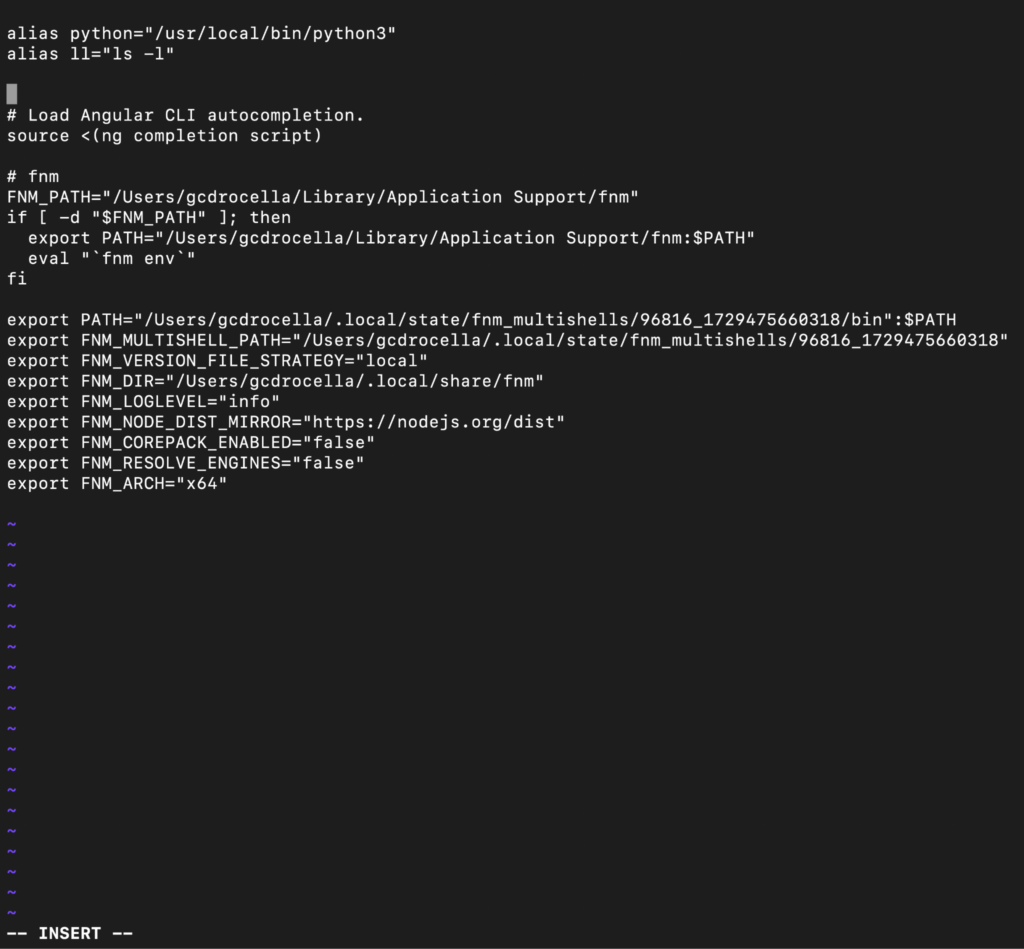
Third, close your current shell, and launch a new zsh shell. Now you can use your newly created aliases.
Enjoy!
References
What’s an ‘alias’ and how do i create one? (n.d.). Utah.edu. Retrieved May 13, 2026, from https://cade.utah.edu/faqs/whats-an-alias-and-how-do-i-create-one/